NumPy handles numbers. Real datasets have column names, missing values, dates and text — and that is what pandas is for. In practice, most of the time you spend on a machine learning project is spent in pandas, not in the model.
The DataFrame
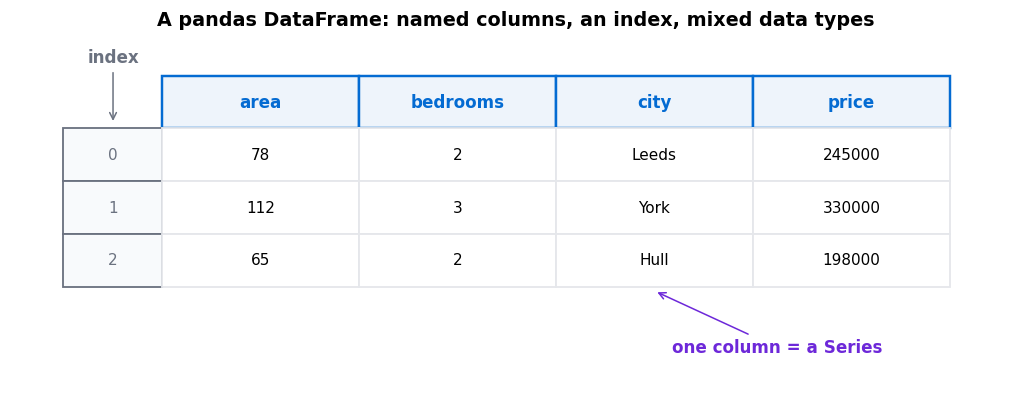
Two objects, and that is the whole mental model:
- A Series is one column — a labelled 1-D array.
- A DataFrame is a collection of Series sharing an index. Each column may have its own type: numbers in one, text in another.
The index is the row labels. It defaults to 0, 1, 2… but can be dates, IDs, anything. It matters because pandas aligns operations on the index, not on position.
The first five things to run on any dataset
df.shape — how much data is there? df.head() — what does it look like? df.info() — what types, and how many nulls? df.describe() — what are the ranges? df.isna().sum() — where exactly are the gaps?Those five lines catch most data problems before they become model problems.
df.info() is the one people skip and should not. It tells you two things at once: whether a column you expect to be numeric has been read as text — very common when a stray “N/A” appears in a number column — and how many non-null values each column actually has.
Selecting rows and columns
| You want | Write |
|---|---|
| One column (as a Series) | df["price"] |
| Several columns (as a DataFrame) | df[["area", "price"]] |
| Rows matching a condition | df[df["price"] > 300000] |
| By label | df.loc[row_label, "price"] |
| By position | df.iloc[0, 2] |
.loc uses labels, .iloc uses integer positions. They look interchangeable while your index is 0, 1, 2 — and then diverge confusingly the moment you filter or sort. Learn which one you mean early.
The operations that do the real work
groupby is the one that repays learning first. Split the data by a column, compute something per group, combine the results:
🧪 Split, apply, combine
df.groupby("city")["price"].mean()reads as: split the rows by city, take the price column of each group, average it. You get one number per city.
This single pattern answers most exploratory questions you will have about a dataset — average by category, count by status, maximum by month.
Also worth knowing early: df.sort_values("price"), df["city"].value_counts() to see category frequencies, df.drop_duplicates(), and pd.merge() for joining two tables on a shared column.
Handing data to a model
scikit-learn wants plain numbers. The usual final step is:
- Separate features from the label:
X = df.drop("price", axis=1)andy = df["price"]. - Make sure everything in
Xis numeric — see encoding categorical variables. - Deal with gaps — see handling missing data.
- Split into training and test sets, and only then scale.
Three things that catch beginners
⚠️ Common pandas traps
- SettingWithCopyWarning. You filtered a DataFrame and then assigned to it, and pandas cannot tell whether you meant to change the original. Use
.locfor the assignment, or.copy()when you filter. - Chained indexing.
df["a"]["b"] = 1may silently do nothing. Writedf.loc["b", "a"] = 1instead. - Most operations return a new object.
df.drop("col", axis=1)does not modifydf— you must assign the result back.
When not to use pandas
pandas is built for data that fits comfortably in memory — up to a few million rows on a normal laptop. Beyond that it becomes slow and memory-hungry, and Polars, DuckDB or Dask are better tools. For a beginner working with public datasets, you are very unlikely to hit that ceiling.
🔑 Key Takeaways
- A DataFrame is a labelled table; one column of it is a Series.
- Run shape, head, info, describe and isna().sum() on every new dataset.
.locselects by label,.ilocby position — pick deliberately.groupbyis split-apply-combine, and answers most exploratory questions.- Most pandas methods return a new object rather than modifying in place.
Further reading
The 10 minutes to pandas tour is the fastest official introduction, and the indexing and selecting guide settles the .loc versus .iloc question properly.
Where to go next
- Handling missing data — the next post in this sequence
- NumPy for machine learning — what sits underneath pandas
- What is a machine learning model? — features and labels explained
- Start Here — the full learning path